Up to 60% | code: GOLDENHOME ⭐0d : 00h : 00m : 00s
Up to 60% | code: GOLDENHOME ⭐ 4d : 13h : 16m : 33s
Article
Photos in one style: analogue film, golden hour and watercolour in the AI editor
•8 minutes reading
Photos from different phones and years do not match on the wall? See how to give them one style in the Framky AI editor: an analogue-film look, golden hour, or watercolour, with ready instructions.
Short answer: Photos from different phones and years look chaotic together because they have different colours, contrast and white balance. The simplest way to hold them together is one style for the whole gallery. In the Framky AI editor, next to each photo, you choose “Edit with AI” and type the same instruction, for example “Black-and-white mood of analogue film, gentle grain, do not change the faces”. Test the style on 2 photos first, then apply it to the rest. One style per gallery, with no mixing.
A holiday photo from a new phone, a birthday from five years ago on an old one, a walk from a friend’s camera. Each one is nice on its own. Together on the wall they look like a random collection: one is bluish, one is yellow, one is oversaturated, one is dark.
The classic advice is: edit the photos so they look like a set. We described that in detail in the article on colour consistency in a gallery. This article goes one step further: instead of evening out the sliders by hand, you give every photo one style with one instruction in the AI photo editor.
Why a mix of photos looks chaotic
The eye compares neighbouring photos faster than their subject. Before you notice who is in the photo, you see that one is cool and the other is warm. Four of the most common differences:
Difference
Where it comes from
How it looks on the wall
White balance
Each phone judges bulb light and daylight differently
One photo blue, the next one orange
Saturation
Newer phones boost the colours
One “shouts”, the rest look faded
Contrast and brightness
Night photos, shots into the sun, photos indoors
Dark patches between bright frames
Sharpness and noise
Older cameras, poor light
Some photos look older than they are
Matching frames help, but they do not remove these differences. A shared style removes them all at once, because each photo gets the same palette and the same contrast.
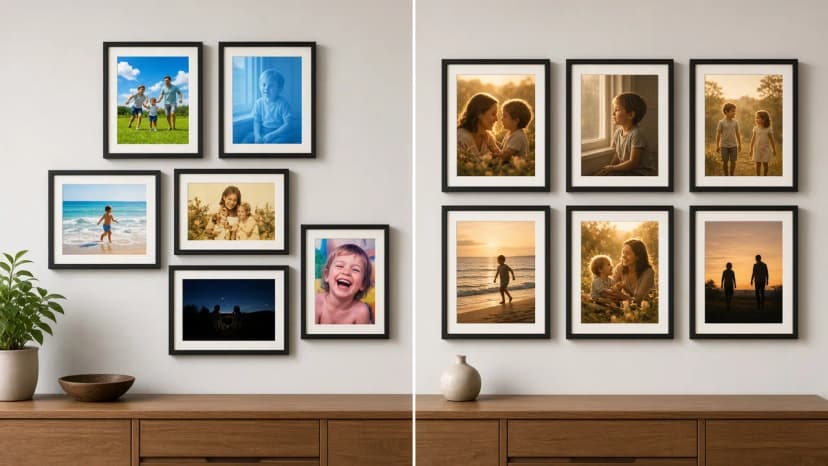
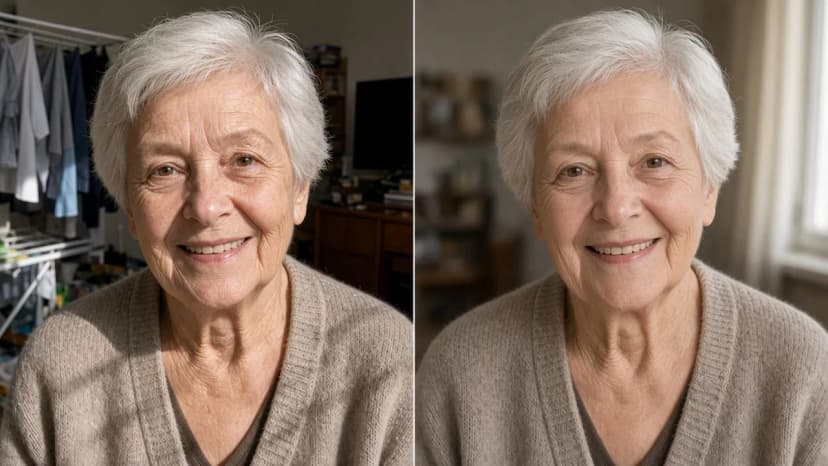
Photos straight from phones on the left, the same subjects in one golden-hour style on the right
Three styles to choose from
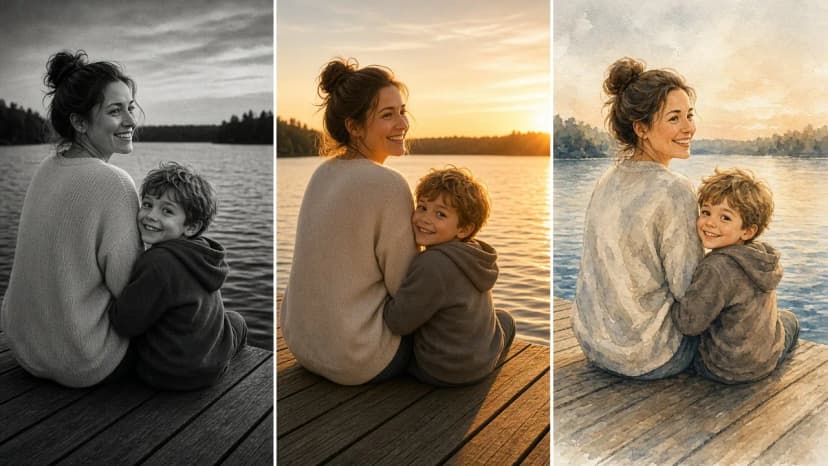
In the AI editor you will find ready ideas for a style, including a black-and-white analogue-film mood, golden-hour light, and watercolour. You can start from a ready idea or describe the style in your own words. This is the same photo in three versions:
One photo, three styles: analogue film, golden hour, watercolour
Black-and-white analogue film
The safest choice when the photos differ a lot. Black and white removes the colour problem entirely, and grain hides differences in sharpness and noise. It joins photos from different decades well, including old prints and new phone photos.
It fits: a corridor, stairs, a bedroom, interiors in white, grey and oak. When black and white works better than colour is covered in black and white or colour.
Example instruction: Black-and-white mood of analogue film, gentle grain, deep blacks, do not change the faces.
Golden hour
Warm, soft light, like just before sunset. It works for outdoor photos: holidays, a garden, walks, the beach. It brings cool and grey photos into one warm tone.
It fits: a living room in beige, oak and green, a kitchen, a dining room. Be careful with night photos and indoor photos under a lamp. There the effect can be less natural, so check the preview especially carefully.
Example instruction: Warm golden-hour light, soft shadows, natural skin colours, do not change the faces.
Watercolour
The photo becomes a picture painted in watercolour. This is the strongest change of the three, so treat it as a choice for a smaller gallery or a child’s room, not for the main wall of family portraits. Landscapes, animals and photos taken from a distance come out well. Close-ups of faces can lose the likeness, so zoom in on the preview before you create the final version.
Example instruction: A gentle watercolour style, a light background like paper, keep the shapes of the faces and the figures.
How not to overdo it
One style is an idea for consistency, not for a special effect. Five rules:
One style per gallery. Mixing analogue film with watercolour gives the same chaos you are trying to leave behind. If you want two moods, make two galleries in different rooms.
A test on 2 photos. Pick the brightest and the darkest photo in the set. If the style works on both, it will work on the rest.
Always the same instruction. Copy it into a note and paste it unchanged for every photo. Even a small difference in the words gives a different tone.
Say what should stay. “Do not change the faces” or “natural skin colours” is the most important part of the instruction for photos of people close to you.
Preview first, then the final version. This usually takes about 10 seconds. You create the full-resolution version for print only when the preview suits you. You see the credit cost of each action before you run it.
If one photo in the gallery has a problem, for example closed eyes or strangers in the background, fix it first with a separate instruction, and apply the style at the end. How to fix closed eyes in a group photo is covered separately.
Want to leave some of the photos in colour? You can, but then plan the layout on purpose. The rules for combining both tones are in how to mix black-and-white and colour photos.
A ready gallery of 6 photos in one style
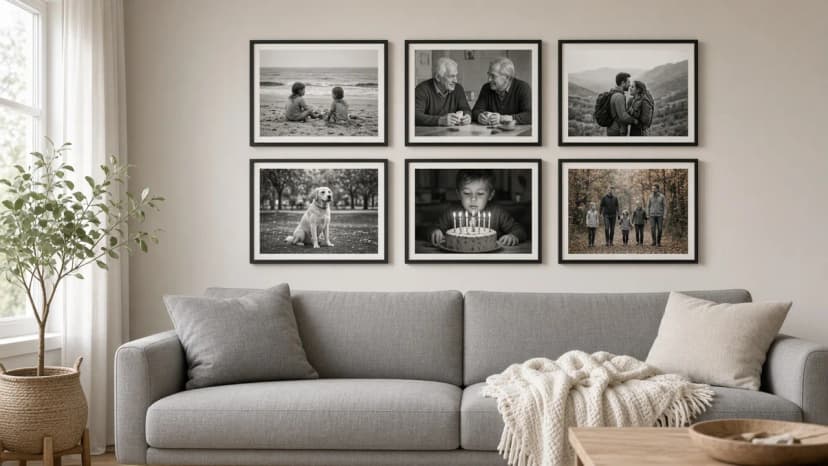
An example set for the wall above a sofa, in an analogue-film style:
Position
Photo
What to watch
Top row, left
Children on the beach
A bright photo, good for testing the style
Top row, centre
Grandparents at the table
An instruction with “do not change the faces”
Top row, right
A walk together in the mountains
The landscape gains from the grain
Bottom row, left
A dog in the park
It comes out well in every style
Bottom row, centre
Blowing out the candles
A dark photo, the second one for the test
Bottom row, right
An autumn walk with the whole family
Figures from a distance, the style will not distort them
Six frames in a 3 by 2 grid with gaps of 5–8 cm look calm, and one style orders it further. The gallery should be about two thirds of the width of the sofa. With a 210 cm sofa, that is about 140 cm. More ideas for layouts of family photos are in the article on a wall of family photos.
Choose 4–8 photos and upload them to a layout in the photo gallery wall.
Choose a style that fits the interior: analogue film, golden hour, or watercolour.
Test the instruction on 2 photos, the brightest and the darkest. Compare the preview with the original on the before-and-after slider. The labels are “Original” and “Edited”.
Apply the same instruction to the rest and create the final versions. Choose “Use in frame” for each one.
Place the order. The set arrives ready to hang, with a 1:1 paper template and self-adhesive hangers.
Keywords
analogue film effect on a photophotos in one stylea consistent photo galleryphotos from different phonesgolden hour effecta photo like a watercolourai photo editorphoto gallery wall
Framky Club
Claim a special discount on your first order
Sign up and we'll send you a code with a bigger discount than the shop offers — plus occasional inspiration for your photo gallery wall.
How to restore an old photo with AI before printing: photograph the print with a phone, ready instructions for the editor, how much to change, which frame size to choose, and how to arrange a remembrance gallery before 1 November.
Someone blinked in a group photo? Open their eyes with one instruction in the Framky AI editor, check the result before print, and make that photo the centre of a family gallery in a 50 × 70 cm frame.
How to smooth wrinkles and blur the background in a portrait of a grandmother, grandfather or parents so the face stays itself. Ready instructions for the Framky AI editor, three levels of retouch, and a portrait in a frame as a gift.